
The Road To Wordy Blob 2 of 3
Having written the plate tectonics views and published it on Android I felt I'd established a pipeline. So next I wanted to create an actual game. I also wanted to start down the road towards education physics software. So I decided on a particle simulation. This episode describes the development of that simulation/game and its support software.
MAUI DEV STORIES
Stephen Moreton-Howell
6/11/20264 min read
A Proper Game
OK, so I'd established that .NET MAUI is pretty fast at drawing. What's the quickest way to get a game up and running? Use that same built-in drawing functionality in ICanvas, add some simple touch handling and do the animation on a timer. But what does every game need? A scoreboard. I wanted to do something other than simply writing numbers at the top of the screen.
But first - the scoreboard





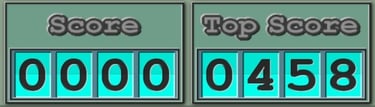
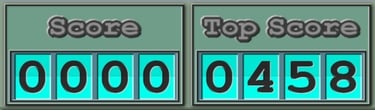


I decided, just for fun, to make the scoreboard system look like those old mechanical split-flap style scoreboards you sometimes saw at railway stations. And this will be a scoreboard that I will re-use in future games.


Split-Flap - Score Flipping Graphics
First let's look at the graphical images needed to achieve this split-flap effect and then look at how I used them in the .xaml and .cs files.
I designed the 10 digits from 0 to 9 with a horizontal fold across the middle and the top half shaded slightly darker than the bottom, to give the impression of a digit printed on a piece of folded card. Here's the example of the digits '3' and '4'.
Flipping between digits (for example from '3' to '4') is a 5 stage animation. This will mean drawing images onto the screen using a timer in the C# code. The images are designed by splitting the digits in half along the fold line. Then, for each digit, there is a fully flattened top and bottom half image and a partially flipped top and bottom half image. Drawing the flip from '3' to '4' therefore looks like this:
At stage 2 the partially flipped bottom half of the '3' is drawn on top of the fully flattened bottom half of the '4'. At stage 4 the partially flipped top half of the '4' is drawn on top of the fully flattened top half of the '3'. When the flipping process is halfway (stage 3) the part of the card being flipped is pointing straight out of the screen so is only visible edge-on.
Stage 1
Stage 2
Stage 3
Stage 4
Stage 5

Split-Flap - The Code
As with the Plate Tectonics Viewer, I use a grid control for the layout of the game. But this time without the strange only-landscape thing. This game only works in portrait mode, with the scoreboard at the top. I want to use this split-flap animation for other number displays too. Not just the scoreboard. So I create an IDrawable derived class which I call ScoreDrawable. The MainPage class contains 4 of these (line 16 of MainPage.xaml.cs):
ScoreDrawable particlesRemainingDrawable, scoreDrawable, targetScoreDrawable, digitalTimeDrawable;
Corresponding to each of these is a GraphicsView object, defined and named in the MainPage.xaml file and placed at an appropriate place in the grid control defined in that .xaml file. So, for example, at lines 41 to 47 of MainPage.xaml we have:
<!-- Current Score -->
<GraphicsView x:Name="ScoreGraphicsView"
Grid.Row="2" Grid.Column="3" Grid.RowSpan="2" Grid.ColumnSpan="1">
<GraphicsView.GestureRecognizers>
<TapGestureRecognizer Tapped="OnTouchCurrentScore"/>
</GraphicsView.GestureRecognizers>
</GraphicsView>
And at line 80 of MainPage.xaml.cs we have:
ScoreGraphicsView.Drawable = scoreDrawable;
So we now have a scoreboard embedded in that grid control and all of its drawings can be done using ICanvas drawing methods within the:
public void Draw(ICanvas canvas, RectF dirtyRect)
method over-ridden from IDrawable in the ScoreDrawable class (line 47). Within that method the drawing code is pretty simple. It just needs to call ICanvas.DrawImage() for each of the digits with the appropriate digit images as defined above. Take a look at that code from lines 47 to 66 of ScoreDrawable.cs for details.
All of these ScoreDrawable objects in the MainPage.xaml.cs are then updated and re-drawn on a timer.


Having established some of what .NET MAUI is capable of, I decided the next app would be a word game, with animation and a scoreboard and all that. But that's the subject of part 3 in this blog series.